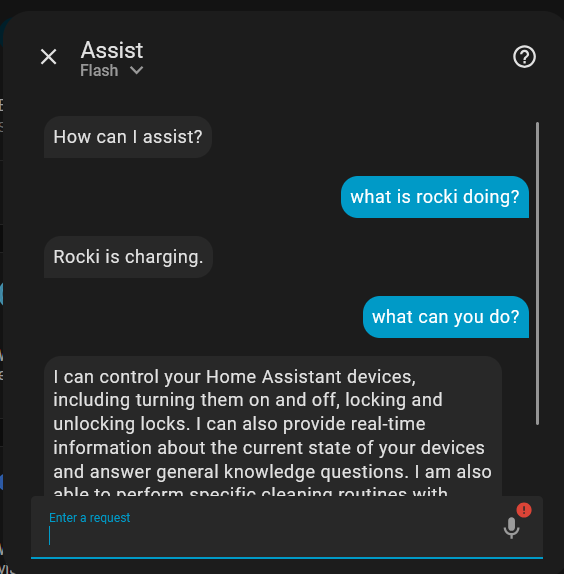
Openclaw. Grosser hype, aber so mega überzeugt hat es mich jetzt nicht. Und mit jedem zweiten Upgrade übrigens, ist er so “eingeschnappt”, dass man direkt die Konfiguration bearbeiten muss und ins Terminal abtauchen darf.
Nun, wofür ist er wirklich gut: Ich nutze Homeassistant um meinen Saugroboter (Roborock S7, liebevoll genannt: Rocki) zu steuern. Homeassistant (HASS) hatte vor einiger Zeit das Year of the Voice. Daraus entstanden ist das kleine weisse Gerät. Homeassistant Voice Preview. Die Integration von Rocki mit HASS ist relativ holprig! Sagen wir, auf einem Level, dass openclaw das sicher nicht konfigurieren könnte. Nun jedenfalls muss man zuerst die Räume aktivieren, und dann die Reinigung starten.
Nachdem ich openclaw am laufen habe, kann man relativ einfach einen Skill erstellen, mit dessen Hilfe Openclaw erfolgreich Rocki steuern kann. Es gelingt openclaw ausserdem, zuerst die Räume zu selektieren, und danach die Reinigung zu starten.
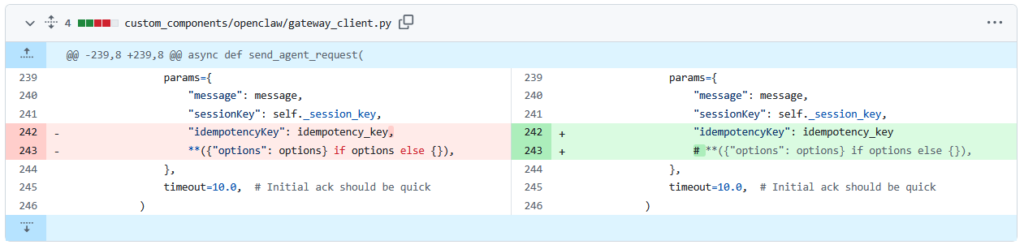
Für eine gelungene Integration mit hass voice preview bedarf es aber dem hass plugin: openclaw-homeassistant und einem mini-fix (siehe Grafik unten). Dann konfiguriert man die Stimmen über die Google API STT (welche ich irgendwie vor ewiger Zeit installiert hatte). Und man kann mittels: “Ok nabu, bitte saug die Küche und das Esszimmer” sehr zuverlässig die Reinigung starten.
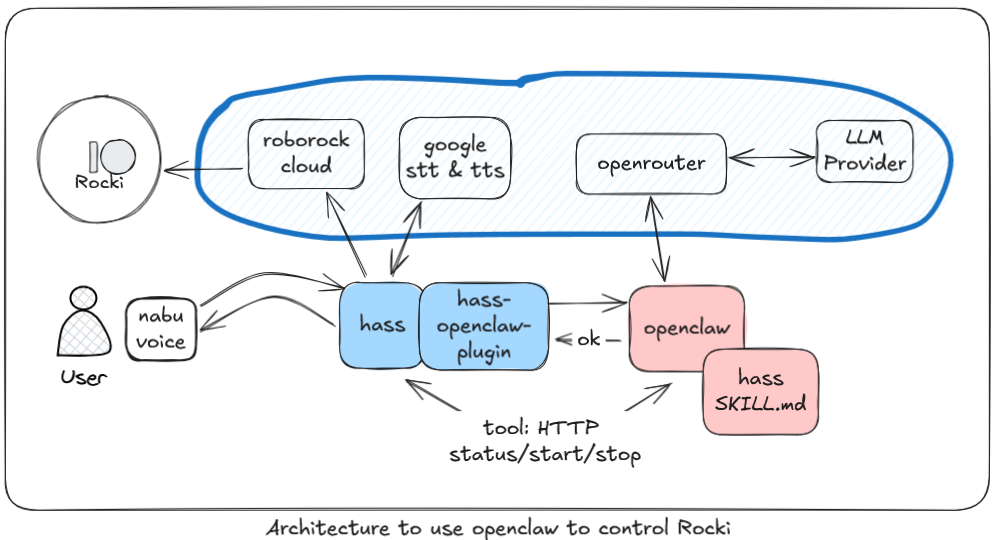
Doch mei-oh-mei, ist das eine Architektur. Nabu => hass => google STT => openclaw => LLM => [1. openclaw tools, etc. => hass ] [2. response to hass about success] => google tts => nabu
Kurzer Einschub: Ähnlich, nur weniger klar konfiguriert ist es nur wenn ich meinen Signal channel verwende: Signal => openclaw => voxtral for stt => openclaw => [1. openclaw tools => hass] [2. message to signal] => tagged tts via openai => signal. Übrigens, diese Konfiguration ist aktuell nciht sehr zuverlässig. Neuerdings generiert openclaw wohl eine tagged message, um openclaw zu signalisieren, dass TTS verwendet werden soll: [[tts: dies ist die nachricht]]
  "tools": {
    "profile": "coding",
    "media": {
      "audio": {
        "enabled": true,
        "models": [
          {
            "provider": "mistral",
            "model": "voxtral-mini-2602"
          }
        ]
      }
    }
  },
  "messages": {
    "ackReactionScope": "group-mentions",
    "tts": {
      "auto": "tagged",
      "provider": "openai",
      "openai": {
        "apiKey": "sk-proj-lRxxxxxxxx",
        "model": "gpt-4o-mini-tts",
        "voice": "fable"
      }
    }
  },
Nun zum eigentlich lustigen, weshalb openclaw einfach nicht überzeugt. Es heisst ja immer, openclaw lerne, konfiguriere sich selbst usw, usw…: Mir ist aufgefallen, dass openclaw in slack immer mit einer audio nachricht antworte. Obwohl er nur antworten sollte, wenn ich anfänglich eine audio nachricht schicke. Also bitte, tomclaw merk dir das:
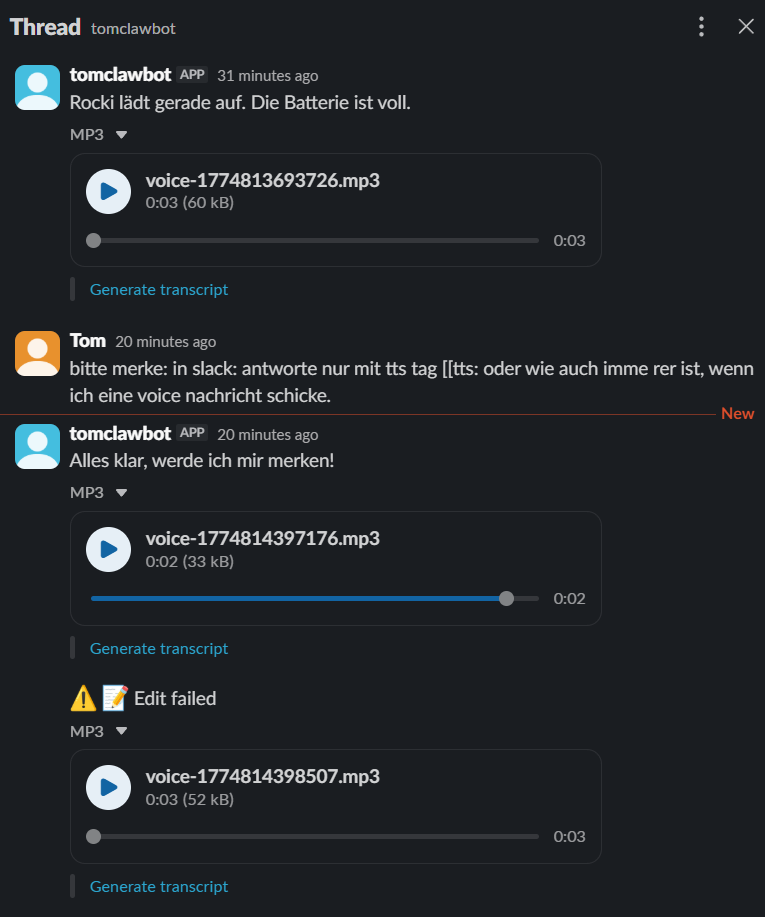
Neue session, neuer Verlauf:
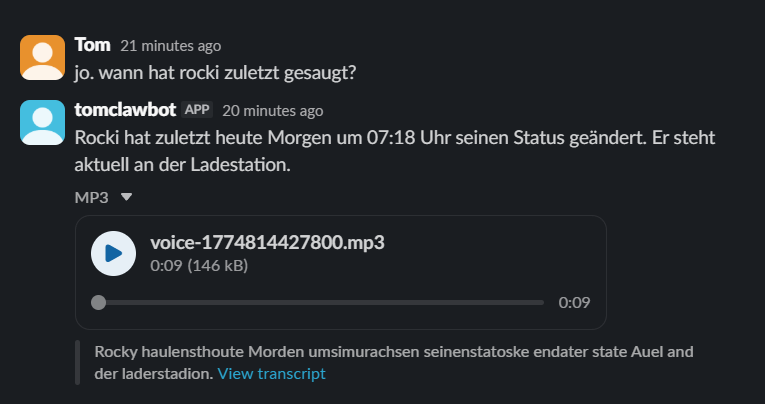
(Funny, das slack transcript – die Nachricht ist aber 1 zu 1 der Text)
Nun, es sind die kleinen Dinge, aber wenn er quasi nicht mal das kann, hab ich nicht sehr viel Vertrauen darin, dass er das macht was ich ihm sage.
Nachtrag:
- Hinzu kommt, standardmässig wird das API token für hass direkt in der TOOLS.md gespeichert und geht so bei jedem LLM request mit raus…, nicht sehr vertrauenserweckend. Ein versuch dies in eine .env-Datei zu verfrachten hat nur dazu geführt, dass er manchmal hass nicht erreichen kann. Je nach modell (sonnet-4.6) funktioniert es, mit dem günstigeren gemini-flash-3.1 eher nicht.
- 5.4.2026: Es könnte sein, ich habe es falsch konfiguriert. Es scheint eine openclaw-integration zu geben: https://www.getopenclaw.ai/integrations/home-assistant. Wobei ich mit diesem Ansatz wahrscheinlich nicht nabu als openclaw voice input nutzen könnte…
Notizen:
- Homeassistant Year of the Voice: https://www.home-assistant.io/blog/2023/12/13/year-of-the-voice-chapter-5/
- https://www.pi-shop.ch/home-assistant-voice-preview-edition
- https://github.com/coolpenguin-dev/openclaw-homeassistant
- Thank you for your work!